Understanding GM MOST Bus Architecture, the Radio Master, and Why Any Node Failure Can Collapse the Infotainment System
Across GM platforms equipped with HMI-based infotainment (IO4/IO5/IO6 MyLink/IntelliLink/CUE), the most common complaint owners experience is a blank or black infotainment screen. Because the HMI generates the video output, the immediate assumption is often:
“My HMI died.”
In reality, the cause of a blank-screen conditions may have nothing to do with the HMI itself.
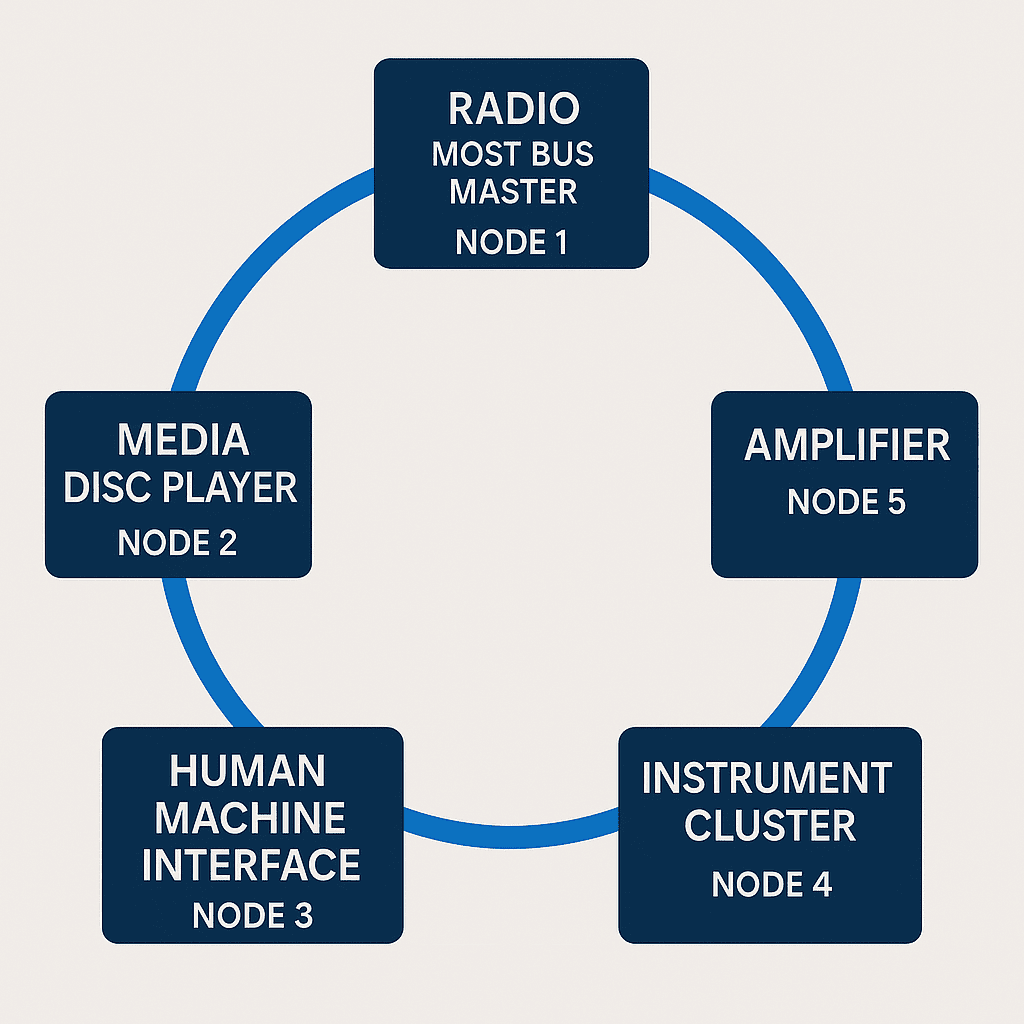
This generation of GM infotainment relies on a digital transport network called MOST (Media Oriented Systems Transport). This network is a closed-loop, synchronous copper ring, where multiple modules depend on each other to function. A fault anywhere in the ring can look like an HMI failure even when the HMI is perfectly healthy.
This guide explains why.
MOST Bus Basics: The Infotainment Backbone
MOST is a high-bandwidth digital network GM uses to transport audio, chimes, video, and control data between infotainment modules. It operates in a ring topology, meaning that every module must pass the signal to the next for the loop to stay intact.
If one device stops responding, loses power, or is simply unplugged, the entire ring collapses.
MOST Nodes in GM Vehicles
ONLY the following modules participate in the MOST ring on these GM platforms:
- Radio (MOST Bus Master)
- HMI (Human Machine Interface)
- Amplifier (Bose, Premium, or Mid-Level)
- Instrument Cluster (MOST-equipped platforms only)
- Media Disc Player (CD or BluRay Player)
MOST Bus Master vs. Slave: The Most Misunderstood Cause of “HMI Failure”
MOST Master: The Radio
In every applicable GM platform with a MOST Bus, the Radio module is the MOST Master.
It provides:
- The timing clock for the entire ring
- The synchronization frames that all other nodes depend on
- The base routing for MOST traffic
If the Radio fails—or even momentarily browns out during a low-voltage event—the HMI immediately loses timing and cannot output video.
This alone will generate:
- Black screen
- No audio
- No chimes
- No Bluetooth
- No navigation
- Frozen or unresponsive display once it returns
…and yet the HMI is perfectly functional.
MOST Slaves: Dependent Modules That Can Take the System Down
Each of the following modules is considered a MOST “slave,” meaning it relies entirely on the Radio’s timing and must echo its frames back into the ring.
If any slave fails, loses power, or develops a wiring/connector issue, the entire ring collapses.
1. HMI (Human Machine Interface)
- Creates the video output
- Relies on MOST timing to initialize
- When the ring collapses → black screen even if brand new
2. Amplifier
- Must relay MOST frames back to the ring
- A dead or unpowered amplifier breaks the loop
- Audio, chimes, and screen typically fail simultaneously
3. Instrument Cluster
(On MOST-equipped platforms)
- Displays audio/nav info
- Relays MOST frames
- A cluster power or communication issue may lead to a ring failure
4. Media Disc Player
(if equipped)
- Serves as another MOST node
- Very common failure point after aftermarket wiring work
- Removing this module (as with any of the others) opens the loop and breaks it.
MOST Bus Failures Always Present Systemically
This is the defining characteristic of MOST failures:
They do not isolate to a single feature. They take down the system.
Symptoms usually include:
- Blank screen
- No audio/chimes
- Delayed or failed startup
- Frozen infotainment behavior
- Random rebooting
- Clock or cluster display anomalies
- Amplifier “pop” events
These symptoms may indicate a MOST ring issue, not a failed HMI.
Common Real-World Causes (Seen Daily at WAMS)
1. Radio Master Failure
The most common cause of a blank screen. Even minor internal faults stop timing generation.
2. Amplifier Offline or Damaged
Water intrusion, blown fuses, or open MOST wiring to the amp will collapse the ring.
3. MOST Connector or Cable Damage
Pin tension, bent pins, aftermarket stereo work, dealer repairs, or even trim panel removal can disrupt the MOST line.
4. Media Disc Player Failed or Unplugged
Frozen or dead disc players frequently knock out the entire ring.
5. Low Voltage / Battery Events
Cranking with a weak battery is notorious for causing temporary MOST desynchronization.
6. Cluster-Related Issues
Applicable platforms only.
If the cluster MOST transceiver loses power or crashes, the HMI goes down with it.
Why This Is Almost Never an HMI Failure
Because the HMI produces the visual output, it gets blamed first.
But MOST failures always manifest as HMI “failure,” regardless of the true root cause.
A perfectly functioning HMI will still produce a black screen if:
- The Radio is offline
- The amplifier is dead
- The MOST ring is open
- Another node fails to echo frames
Replacing the HMI without diagnosing the MOST chain leads to unnecessary expense and no fix.
How to Correctly Diagnose MOST-Based Black Screen Conditions
GM dealers and professional shops typically follow these steps:
- Verify power and grounds to all MOST nodes
- Check Communication codes (U-codes) in Radio, HMI, Amp, Cluster
- Perform MOST Bus Integrity Testing
- Temporarily bypass failed MOST nodes (advanced)
- Inspect MOST connectors and cable routing
- Validate the Radio (MOST Master) initializes properly
When in doubt, the MOST master—the Radio—should be verified first because it is the most common point of failure.
Bottom Line
A blank screen does not automatically indicate an HMI failure.
MOST architecture ensures that:
- One module offline → entire ring collapses
- HMI cannot initialize → screen remains black
- The root cause is often elsewhere in the chain
Understanding MOST is critical to accurate diagnosis and prevents unnecessary HMI replacement this is why we state that ANY HMI replacement (except for “Waiting for Update Media”) needs a GM dealer diagnosis prior to purchase as these systems can be quite complex.