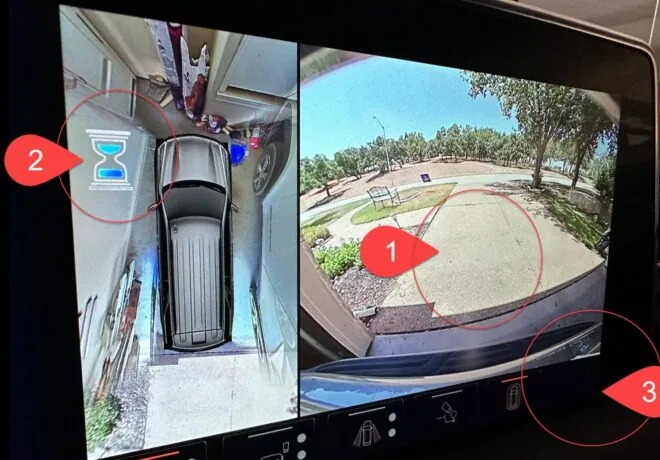
On many modern GM vehicles, camera issues frequently appear after swapping mirror assemblies — especially when converting between standard mirrors and trailering mirrors, or converting back to standard mirrors that still contain cameras.
Common symptoms include clipped or cropped camera views, incorrect image framing, missing or incorrect guidelines, features that stop functioning, or a persistent hourglass icon. These issues are often assumed to be calibration failures. In reality, they are most often caused by a camera processing configuration mismatch created by the mirror change, not a fault with the cameras themselves.
This Tech Note explains why normal calibration procedures often complete or partially complete yet fail to resolve these issues, and why standard dealer workflows do not correct them.
The Primary Trigger: Mirror Swaps
Mirror assemblies on GM vehicles are not passive components. Depending on the configuration, mirrors may contain:
- Side view cameras
- Different lens characteristics
- Different assumed fields of view
- Different image geometry profiles
When a vehicle is converted:
- From standard mirrors to trailering mirrors
- From trailering mirrors back to standard mirrors with cameras
…the physical cameras may still be present, powered, and functional. However, the vehicle’s camera processing logic may continue operating under the previous mirror configuration.
This mismatch is the root cause of most camera issues seen after mirror swaps.
Typical Symptoms After a Mirror Swap
After mirrors are changed, owners may experience:
- Camera views that appear zoomed, clipped, or cropped
- Surround or bird’s-eye views that do not stitch correctly
- Dynamic guidelines that are missing, offset, or incorrect
- Certain camera-based features that no longer function
- A persistent hourglass icon on one or more camera screens
These symptoms often occur even when:
- No diagnostic trouble codes are present
- Cameras are detected and recognized by the vehicle
- No obvious hardware faults exist
How Camera Calibration Normally Works
On many GM vehicles, camera calibration is performed automatically during normal driving. The system uses vehicle motion, reference points, and environmental data to align camera positioning and finalize setup.
When the camera processing configuration matches the installed hardware, this process completes normally and camera features operate as intended.
Why Calibration Fails After a Mirror Swap
After a mirror swap, the camera processing module may no longer be able to reconcile what it is seeing with how it expects the system to be configured.
As a result:
- Calibration may start but never finalize
- The hourglass icon may appear and never clear
- Dynamic guidelines may not function
- Camera images may display incorrectly even though the cameras themselves are working
In these cases, calibration is not failing due to camera alignment. It is failing because the system is attempting to process camera data using incorrect mirror and image geometry assumptions.
This is a configuration mismatch, not a hardware failure.
The Role of Camera Processing Modules
GM vehicles use one or more camera processing modules to control:
- Field-of-view assumptions
- Image cropping and scaling
- Surround vision stitching logic
- Guideline generation
- Camera view layout and behavior
When mirrors are swapped, these modules must be reconfigured to match the installed mirror type. Without this step, the system continues operating as if the original mirrors are still present.
This is not a calibration defect and not a camera fault — it is a processing configuration issue.
Why Standard Dealer Procedures Often Do Not Resolve This
Standard dealership procedures typically focus on:
- Verifying camera operation
- Running calibration or relearn routines
- Confirming that no fault codes are present
While these steps are necessary for basic diagnostics, they do not change the mirror-specific camera processing configuration.
There is no dealer SPS procedure, relearn routine, or calibration step that updates the vehicle’s camera processing logic to match a newly installed mirror type.
As a result:
- Calibration may be marked complete
- The vehicle may be returned to the owner
- Camera views may remain clipped or incorrect
- Hourglass icons may persist
This is not a technician error. It is a limitation of factory tooling, which assumes the vehicle’s mirror configuration has not changed.
Summary
When camera issues appear after swapping mirrors on a GM vehicle:
- The cameras are usually functional
- Calibration may initiate or partially complete
- The system cannot finalize operation because it cannot reconcile camera data with its current configuration
Correcting this requires custom programming the VPM so that it processes and displays camera data that matches the installed mirror configuration. Once the programming is corrected, calibration can complete normally and camera features function as intended.
Frequently Asked Questions
Q: Why does calibration usually involve just driving the vehicle?
A: On many GM vehicles, calibration is automatic and performed during normal driving. The system relies on correct camera configuration to finalize calibration.
Q: Why does the hourglass appear after a mirror swap?
A: After a mirror swap, the camera processing module may no longer be able to reconcile what it sees with its configured geometry, causing the system to remain in an initialization state.
Q: Are the cameras usually bad when this happens?
A: No. In most cases the cameras are functional, but the system is processing the images using incorrect mirror assumptions.
Q: Can a GM dealer fix camera issues caused by mirror swaps?
A: No. GM dealerships do not have a service procedure to change mirror-specific camera processing configuration. Calibration and relearn routines do not resolve this issue once a mirror swap has occurred.
Final Note
This issue is frequently misdiagnosed as a calibration failure or defective camera. In reality, it is a configuration mismatch introduced by changing mirror hardware — one that requires correcting how the vehicle processes camera data before calibration can complete successfully.