Ghost Touches, Phantom Inputs, and Random Screen Behavior in GM Vehicles
Owners of GM vehicles frequently report strange infotainment behavior described as ghost touches, phantom inputs, or random screen presses. These issues can make the system feel as if it is being operated by itself — applications moving, selections triggering, audio sources changing, or screens cycling without any driver input.
This tech note explains what actually causes these symptoms, why they are not an HMI failure, and why replacing the entire screen assembly is almost always the correct repair.
Common Symptoms of Ghost Touch or Phantom Input Issues
Vehicles experiencing touchscreen digitizer or controller failure often show one or more of the following behaviors:
- Random or repeated screen presses without touching the display
- Applications opening, closing, or moving on their own
- Menu selections being chosen without user input
- Radio stations, audio sources, or inputs changing by themselves
- Audible beeps or confirmation tones from phantom button presses
- Volume, tuning, or track skip actions triggering unexpectedly
- Touchscreen becoming partially or completely unresponsive
- Screen behaving normally when cold, then failing once warmed up
In many cases, the issue also presents as unexpected changes on the instrument cluster display, including:
- The center cluster screen cycling through different views
- Cluster pages changing that are normally accessed using touchscreen gestures
- Infotainment-related cluster screens appearing to navigate without driver input
Because these symptoms span audio, infotainment, and cluster behavior, they are often misdiagnosed as multiple failing modules. In reality, they share a single root cause: false input generated by a failing touchscreen digitizer and its controller.
What Actually Causes Ghost Touches in GM Infotainment Systems
In nearly every confirmed case, ghost touches and phantom inputs are caused by a failure within the touchscreen digitizer assembly, which includes both the digitizer surface and its main digitizer controller.
The touchscreen assembly consists of multiple bonded components, including:
- The glass touch surface
- The capacitive digitizer layer
- The digitizer or main display controller
The digitizer controller is responsible for interpreting touch signals and translating them into system commands. In many GM infotainment systems, this controller also participates in radio and infotainment control signaling, which is why failures often affect audio behavior in addition to touch input.
When the controller begins to fail, it can and often does generate false or unstable signals that the system interprets as valid user input — even when the screen is not being touched.
We have found over the years that failure following a CarPlay/Android Auto upgrade is very common as the screen likely has had a decade or more of thermal cycling and the first removal of the screen to replace the Radio/ACM Module breaks it.
Why Replacing Only the Digitizer Often Fails
Many repair attempts focus on replacing just the digitizer glass. While this may temporarily reduce symptoms, it commonly fails long-term because:
- The digitizer or main display controller is already damaged, not just the touch surface
- The controller may continue to inject false input even with new glass
- Heat cycling worsens marginal controller faults over time
- Rebonding the digitizer does not restore controller signal integrity
- The controller may also be responsible for radio and system input handling
Once the controller is compromised, replacing only the digitizer does not address the root cause. This is why symptoms often return — sometimes worse — after partial repairs.
Why This Is Not an HMI Failure
The HMI module does not generate touch or radio input commands.
Its role is to process and display data received from other modules. When ghost touches or phantom inputs occur:
- The HMI is responding correctly to corrupted input signals
- Software updates do not resolve the issue
- Reprogramming does not change the behavior
- Replacing the HMI does not fix the problem
If the touchscreen controller is issuing false commands, the system behaves exactly as designed — it simply reacts to what it believes are legitimate inputs.
The Correct Repair: Full Screen Assembly Replacement
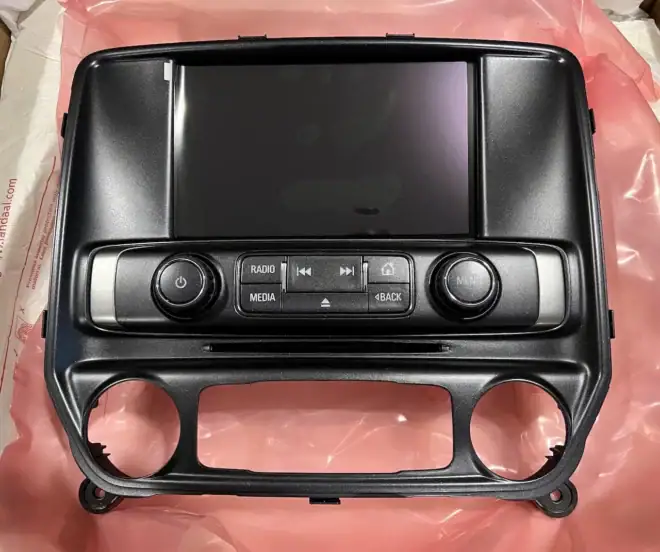
For GM vehicles equipped with 8-inch infotainment displays, the correct and reliable repair is replacing the entire touchscreen display assembly, not just the digitizer layer.
A complete replacement screen assembly:
- Includes a new digitizer and controller
- Restores stable touch and control signal interpretation
- Eliminates phantom inputs permanently
- Restores proper radio, menu, and gesture behavior
- Maintains OEM brightness, resolution, and responsiveness
- Prevents repeat failures and rework
This is why WAMS supplies complete replacement infotainment screen assemblies rather than loose digitizers.
Why This Matters for Long-Term Reliability
Ghost touch failures rarely remain isolated. Heat, humidity, vibration, and normal vehicle operation accelerate degradation, often leading to:
- Complete loss of touch functionality
- Loss of reliable audio and infotainment control
- Driver distraction and safety concerns
- Repeated repairs when partial fixes are attempted
Replacing the full screen assembly resolves the issue correctly the first time and restores OEM-level behavior across all affected systems.
Summary
If your GM infotainment system is experiencing ghost touches, phantom inputs, radio changes, audible beeps, or unexplained cluster screen changes:
- The cause is almost always a failing digitizer and its controller
- The controller frequently handles radio and infotainment inputs as well
- This is not an HMI or software issue
- Replacing only the digitizer often fails
- A complete screen assembly replacement is the correct fix
Correct diagnosis prevents unnecessary module replacement and restores reliable operation.