
Description
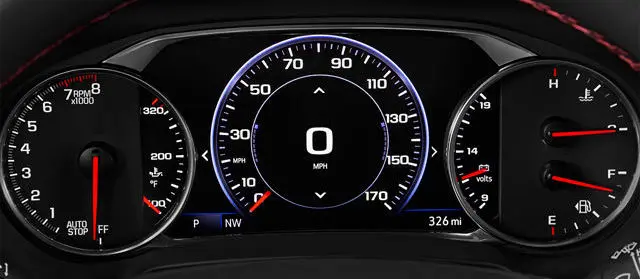
Upgrade your 2020 through 2024 Chevrolet Traverse with the WAMS 8″ Digital Cluster Upgrade Kit, engineered to replace your factory base instrument cluster with the genuine GM 8″ color reconfigurable Driver Information Center — RPO code UHS, the same uplevel display fitted from the factory to the Premier and High Country. It boots with the correct Chevrolet startup graphics, keeps full steering wheel control support, and retains original menu functionality. Every unit arrives preprogrammed to your VIN, tailored to your model year and option content, and ready for plug-and-play installation. Whether your Traverse is equipped with factory navigation, park assist, or other factory options, we configure the cluster to match your build. Each unit is brand-new, backed by full GM warranty, and engineered for seamless OEM-grade operation.
The High Country and Premier Cluster, for Your LS, LT, or RS
This kit fits 2020–2024 Chevrolet Traverse models that left the factory with the base instrument cluster and its small monochrome or low-resolution driver information display — typically the LS, LT, and LT Leather trims, and RS models built without the uplevel display.
This is the wrong cluster if your Traverse already has the 8″ color reconfigurable display. That uplevel cluster was standard on Premier and High Country and available on some RS builds — those vehicles already have this unit and do not need the kit. If you are unsure, check your trim or send us your VIN before ordering and we will confirm fitment for you.
IMPORTANT — if you have a 2024, check whether it’s a Traverse or a Traverse Limited. For the 2024 model year Chevrolet sold two different vehicles under the Traverse name. The 2024 Traverse Limited is the previous-generation body carried over for one final year, and this kit fits it. The 2024 Traverse is a ground-up redesign on different architecture with an 11″ driver display, and this kit does not fit it and cannot be adapted to it. Look for “Limited” on your window sticker or door-jamb label, or just send us your VIN and we’ll tell you in a minute.
This kit also does not fit 2018–2019 Traverse models, which use an earlier infotainment architecture.
Your VIN Does the Work
GM revised this cluster inside the 2020–2024 range, and the units are not freely interchangeable across every year. You don’t need to know any of that. Enter your VIN at checkout and our fitment resolver identifies the correct cluster for your exact build — model year, trim, and option content included. There is no part number to cross-reference, no engine to select, no dropdown to get wrong, and no guessing. If your VIN turns up anything ambiguous, we contact you before the order goes to the manufacturer.
Radio Compatibility
The Music, Navigation (if equipped), and Phone cluster display menus are driven by your factory radio. Across this range the Traverse shipped with one of four — IOR, IOS, IOT, or IOU — and this cluster works with all of them. Music and Phone menus populate on every one of them, as do steering wheel audio control and steering wheel cluster-interaction control.
Navigation is the exception, and it splits the four radios in two. IOT and IOU left the factory with embedded navigation — on those vehicles you get the complete menu set, including the in-cluster Navigation page and the Speed Limit display. IOR and IOS did not have factory navigation. On those vehicles those two pages will not populate, because there is nothing for the cluster to read from. Every other cluster function is identical across all four radios.
Please read this before you order if you have IOR or IOS. You never had factory navigation, so nothing is being taken away from you — but if you’ve seen this cluster pictured or demonstrated with a navigation map page or a speed limit readout, and that is part of why you want it, those two pages are not going to appear on your vehicle as it sits today. No programming we do to the cluster can create them; the data has to come from the radio.
If you have IOS, there is a direct path. Our IOS Navigation and HD Radio Upgrade Service is a ship-in service for your factory radio module that adds full factory embedded navigation and HD Radio, bringing your IOS radio up to IOU specification — including GM back-end features like OnStar send-to-vehicle destinations. Once that’s done, the cluster’s Navigation page and Speed Limit display work exactly as they do on a car that left the factory with navigation. Order it alongside the cluster and you get the complete experience in one go.
If you have IOR, that service does not apply to your radio. Contact us before ordering and we’ll tell you what your options are on your specific vehicle. We configure all of these units for navigation regardless of what you have today, so if you move to a navigation-capable radio later the cluster is already set up for it and doesn’t need to come back to us.
PLEASE NOTE: These units are special order and subject to varying lead time beyond our control. Please make sure you triple check your selected cluster before checking out, as the system automatically places an order with the manufacturer.
Frequently Asked Questions
Is this the same cluster that comes in the High Country and Premier?
Yes. The 8″ color reconfigurable Driver Information Center in this kit is the same display GM fits from the factory to the Traverse Premier and High Country, and to RS models ordered with the uplevel display. This kit puts that cluster into an LS, LT, or RS that was built with the base display instead.
Can I upgrade from the standard cluster to the 8″ multi-color (UHS) cluster?
Yes — that is exactly what this kit does. The 2020–2024 Traverse was offered with two cluster types: the standard display, and the upgraded 8″ multi-color graphic Driver Information Center carrying RPO code UHS. This kit supplies the UHS cluster, brand-new from GM, programmed to your VIN. It is a direct physical and electrical replacement; there is no wiring, no cutting, and no adapter harness involved.
How does this work?
Enter your VIN and check out. Our fitment resolver reads your build and identifies the correct cluster for your exact vehicle — model year, trim, and option content — and we program the unit to your VIN before it ships. When it arrives, pull the old cluster and plug the new one in. That’s the whole job.
How much does a Traverse digital cluster upgrade cost?
This kit is $699.99 and that is the complete price — brand-new genuine GM cluster, VIN programming, and no core charge. You will see used and salvage Traverse clusters listed far cheaper elsewhere. Those are pulled units with unknown history that still have to be programmed to your vehicle by someone, and a used cluster carries no GM warranty. This is a factory-fresh part with full GM warranty behind it.
How do I know if this is the right cluster for my Traverse?
This kit is for 2020–2024 Traverse models that currently have the base instrument cluster — typically LS, LT, and LT Leather, plus RS builds without the uplevel display. If your Traverse already has the 8″ color reconfigurable display, it already has this unit and does not need the kit. When in doubt, send us your VIN before ordering and we’ll confirm.
I have a 2024 — does this fit?
It depends which 2024 you have, and this catches a lot of people out. For the 2024 model year Chevrolet sold two different vehicles under the Traverse name: the all-new redesigned Traverse, and the 2024 Traverse Limited, which is the previous-generation body carried over for one more year. This kit fits the 2024 Traverse Limited. It does not fit the redesigned 2024 Traverse, which uses a completely different architecture with an 11″ driver display. Check your window sticker or the label in your driver’s door jamb for “Limited,” or send us your VIN and we’ll confirm it for you.
What’s the difference between a 2024 Traverse and a 2024 Traverse Limited?
They’re two separate vehicles sold in the same year. The Traverse Limited is the second-generation body — the same vehicle sold from 2018 through 2023 — built one final year alongside the redesigned model. Mechanically and electronically it is the older vehicle, which is why this kit fits it and does not fit the new one. If you’re unsure which you have, the VIN settles it.
Will it work with my radio? I don’t have navigation.
Yes. Across this range the Traverse shipped with one of four radios — IOR, IOS, IOT, or IOU — and the cluster works with all of them. On a car without factory navigation the Music and Phone menus populate normally, as do your gauges, trip computer, vehicle information pages, steering wheel audio control, and steering wheel cluster controls. The only pages that need a navigation-equipped radio are the Navigation menu and the Speed Limit display. IOT and IOU have factory navigation and show everything; IOR and IOS do not, so those two pages stay blank on those vehicles.
Will I get the navigation map and the speed limit display in the cluster?
Only if your Traverse has a navigation-equipped radio, which means IOT or IOU. If you have IOR or IOS, those two pages will not appear, because neither one left the factory with navigation for the cluster to read from. Every other page and menu on the uplevel cluster works normally on both. We’d rather you know this before you order than after.
If you have IOS, you can fix it: our IOS Navigation and HD Radio Upgrade Service is a ship-in service that adds factory embedded navigation and HD Radio and brings your radio up to IOU specification. Do that and the cluster’s Navigation page and Speed Limit display work exactly as they would on a factory navigation car. If you have IOR, that service doesn’t apply to your radio — get in touch and we’ll tell you what your options are.
How do I know which radio I have?
You don’t need to know in order to order — your VIN tells us — but it tells you what to expect. Scan the QR code on the build label in your driver’s door jamb and look for the radio RPO: IOR, IOS, IOT, or IOU. IOT and IOU have factory navigation and drive every cluster page. IOR and IOS do not, so the Navigation page and Speed Limit display stay blank — and of those two, only IOS has an upgrade path.
I plan to add factory navigation later — will the cluster show the speed limit then?
Yes. We set every one of these up for navigation regardless of what the vehicle has today, so when you do the navigation upgrade the cluster is already configured and doesn’t need to come back to us for a second round of programming.
Do I need a dealer, or a scan tool, after I install it?
No. The unit ships programmed to your VIN. There is no dealer visit, no relearn procedure, and no scan tool required on your end.
Do you need my current mileage? What happens to my odometer?
Nope. On these vehicles the odometer is stored in the vehicle, not in the cluster, so the new unit syncs to your actual mileage the moment you install it. Your correct mileage will be there with no intervention from you and nothing to send us.
Do I need to send in my factory cluster?
Nope. We are sending you a factory-fresh unit and there is no core charge. Your original cluster is yours to keep or sell.
Do I need to match my model year?
Yes, and your VIN handles it. GM revised this cluster within the 2020–2024 range, and if you want full OEM functionality and want to retain your factory or factory-backed extended warranty, the cluster has to match your vehicle’s model year and build. Our resolver does that matching from the VIN you enter at checkout — there is nothing for you to look up.
Do I need steering wheel controls?
Yes. You need factory, or properly retrofit, steering wheel controls to interact with the menus on these units.
Will I lose any features?
You should not lose anything you had before, though some items are grouped into different menus or pages on the uplevel display. The one thing worth knowing is that the in-cluster Navigation and Speed Limit displays require a navigation-equipped radio — IOT or IOU. On an IOR or IOS vehicle those particular pages won’t populate. Everything else carries over.
Will I gain any features?
Yes — that’s the point of the upgrade. You get the full 8″ color reconfigurable display with selectable gauge layouts and considerably more information than the base cluster shows. The uplevel cluster also has slightly different menu selections, and we can enable indicators for factory options you’ve added, such as front park assist or a navigation menu after a navigation retrofit. If you’ve added FACTORY options your Traverse didn’t have when it was built, list them in the order notes at checkout.
Can you delete warning indicators for items I’ve removed from the vehicle?
Yes we can. That’s custom work and priced as such — contact us for details.
Can you do this for Export (metric clusters)?
Absolutely, supplied the same way as US-spec units. Generally the only real differences are the fuel gauge icons and the temperature scale. If you’re fine with the US version, order that and we’ll set the center display speedometer to metric.
My MPG and range readings are way off right after install — is that normal?
Completely normal. The new cluster has no baseline yet. It should normalize, or come close, after one full tank of fuel is consumed and the vehicle is filled up. The remote app may take longer since it uses a lifetime MPG figure.
Will the cluster look exactly like the product photo?
It will look correct for your model year and your vehicle’s options, but not necessarily identical to every photo or video you’ve seen. Exact graphics and menu content vary by year and by how your Traverse was equipped. The most common difference: if your vehicle has an IOR or IOS radio, the Navigation page and Speed Limit display shown in some images will not be present on yours, because neither radio has factory navigation to feed them. Everything else will be configured properly for your specific vehicle.
Reviews
There are no reviews yet.