
Here is a conversation we have almost every week. An owner’s infotainment screen is black. No audio, no chimes, no Bluetooth, no navigation. We tell them the HMI or the MOST bus is the problem. And they push back with a completely reasonable objection:
“But my backup camera still works. If the screen were really dead, how would the camera come up?”
It is a fair question, and the answer surprises most people: GM designed the backup camera to keep working when the infotainment system fails. That is not a happy accident. It is a deliberate engineering decision driven by federal safety regulation, and the component responsible for it is called the HMI Bypass Module.
So a working backup camera tells you almost nothing about the health of your HMI. Understanding why will save you a lot of second-guessing during a diagnosis.
What the HMI Bypass Module Is
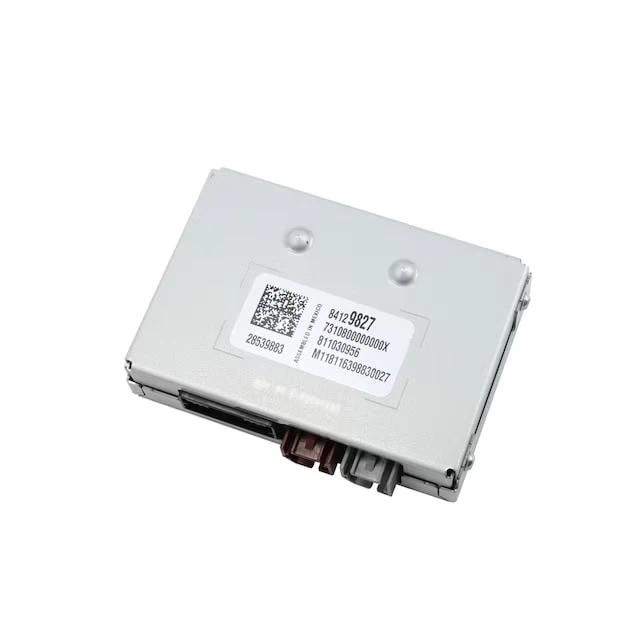
The HMI Bypass Module is a factory GM component found on IO5 and IO6 equipped vehicles beginning around the 2017 model year. It is not an aftermarket device, not a dealer add-on, and not something anyone installs after the fact — it left the assembly plant in the vehicle.
Its position in the video path is the whole story. Camera video does not run straight to the HMI. It goes:
Camera → HMI Bypass Module → HMI
That intermediate step is what allows the camera image to reach the display without depending on the HMI’s normal infotainment functions or on the MOST bus being intact. When the rest of the system goes down, the camera image still gets where it needs to go.
The name causes some confusion, because “bypass” in the GM aftermarket usually refers to lockpick devices, video-in-motion hacks, and similar workarounds. This is not that. This is GM’s own name for a factory safety component, and it has nothing to do with unlocking features.
Why GM Added It: Federal Law
In 2014 NHTSA finalized a rule amending Federal Motor Vehicle Safety Standard 111 (FMVSS 111), Rear Visibility. After a phase-in period, 100 percent of new vehicles under 10,000 lbs GVWR built on or after May 1, 2018 were required to have a compliant rear visibility system.
The standard does not simply say “install a camera.” It sets performance requirements the system has to meet:
- Field of view — the system must show a 10 foot by 20 foot zone directly behind the vehicle
- Response time — the image must be displayed within 2.0 seconds of the backing event beginning
- Image size — minimum dimensions for the displayed image
- Linger time — how long the image remains after the backing event ends
- Deactivation — when and how the image is allowed to turn off
- Default view and durability requirements
The response time requirement is the one that matters here. Two seconds is not much margin, and it has to be met reliably — not just when everything in the vehicle is behaving.
That is a hard promise to keep if the camera image depends on a chain of infotainment modules all initializing correctly first.
Which Vehicles Have the HMI Bypass Module
The bypass module appears on IO5 and IO6 equipped GM vehicles beginning around the 2017 model year. That timing is not a coincidence — it lines up with the FMVSS 111 compliance deadline.
Full compliance was required for vehicles manufactured on or after May 1, 2018. Manufacturers phase changes like that in ahead of the deadline rather than flipping a switch on the date, and 2018 model year production begins during the 2017 calendar year. A 2017 model year introduction is exactly what you would expect from an engineering change driven by that rule.
A few things worth knowing about coverage:
- Earlier IO5 and IO6 vehicles do not have it. If your vehicle predates the change, camera video does not have this independent path, and an infotainment failure can take the camera with it.
- IO4 vehicles are outside this discussion entirely — that system was already being phased out by the time the bypass module arrived.
- CSM-equipped vehicles are a different architecture. If your vehicle uses a CSM rather than an HMI, none of this applies — see our HMI vs. CSM guide for the distinction.
The fastest way to confirm what your specific vehicle has is the RPO codes on your SPID label, or send us your VIN and we will pull the build data.
The MOST Bus Problem
GM infotainment of this era runs on MOST (Media Oriented Systems Transport) — a closed-loop, synchronous ring network. Every module on the ring has to pass the signal to the next one for the loop to stay intact. Our MOST bus black screen diagnosis article covers the architecture in depth, but the short version matters here:
- The Radio is the MOST Master — it supplies the timing clock and synchronization frames every other node depends on
- If any node stops responding, loses power, or is unplugged, the entire ring collapses
- If the Radio fails or even briefly browns out during a low-voltage event, the HMI loses timing and cannot output video
- Cranking with a weak battery is notorious for causing temporary MOST desynchronization
Now put those two things side by side. Federal law requires a rear camera image within two seconds, every time. The infotainment architecture is a ring network where a single weak battery, one failed amplifier, or one bad connector takes down the entire video path.
Routing a federally mandated safety feature through that chain would mean any one of those failures also disables the backup camera — and takes the vehicle out of compliance. The HMI Bypass Module is how GM solved that. The camera signal reaches the display through a path that survives an infotainment failure.
What This Means for Your Diagnosis
This is the part that trips people up, so it is worth stating plainly:
A working backup camera is not evidence of a working HMI or a healthy MOST bus.
The camera is specifically engineered to survive the exact failure you are trying to diagnose. It working correctly tells you two things and only two things: your display panel is functional, and the camera itself is functional. It tells you nothing about the HMI, the Radio, the amplifier, or the state of the MOST ring.
Owners frequently reach the opposite conclusion — “the screen clearly works, I’ve seen the camera on it, so the screen and the head unit must be fine.” That reasoning is understandable and it is wrong, because it assumes one video path where there are two.
What Still Breaks When the HMI or MOST Bus Is Down
If your camera works but the infotainment system is out, expect to have lost all of the following:
- Radio, audio, and all sound output
- Chimes and audible warnings
- Bluetooth and hands-free calling
- Apple CarPlay and Android Auto
- Navigation
- Vehicle settings menus and personalization
- Climate control display and touch interaction, on vehicles that route HVAC through the screen
Notice what is not on that list: cameras. Camera views route through the bypass module, so they keep working. On the small number of HMI-equipped vehicles that have surround view, those views go through the bypass path as well — meaning a complete, fully functional camera system can coexist with a completely dead infotainment system. If anything, a camera suite that works perfectly while everything else is gone is a textbook presentation of this failure, not evidence against it.
How to Tell What You Are Actually Dealing With
A working camera with everything else dead points toward an infotainment failure, but it does not identify which module. That distinction matters, because a black screen can originate from the HMI, the Radio, the amplifier, a broken MOST ring, or a low-voltage event — and replacing the wrong one is expensive.
Things worth checking before assuming the HMI:
- Battery and charging system health. Low voltage during cranking is a common cause of temporary MOST desynchronization. A marginal battery can produce symptoms that look exactly like a failed module.
- Whether the failure is intermittent or permanent. A system that comes back after a rest or a battery disconnect behaves differently than one that never returns.
- Whether audio is also gone. Total loss of audio alongside the black screen points at the ring or the Radio, since the Radio is the MOST Master.
- Stored DTCs. A proper scan with manufacturer-level data is what separates a failed HMI from a broken ring. Our writeup on B101E and U0028 codes covers what those specific codes indicate.
We recommend a GM dealer diagnosis before any module is ordered. Replacement modules are VIN-programmed and non-returnable, so the diagnosis protects the order, not just the troubleshooting.
If the Diagnosis Comes Back as the HMI
Once a failed HMI is confirmed, WAMS supplies brand-new OEM HMI modules programmed to your VIN and ready to install. Never salvage, never refurbished, never core-based — see our New OEM GM Hardware Only Standard for why that matters on modules that carry configuration and security data.
If you are not sure whether your vehicle uses an HMI or a CSM, our HMI vs. CSM guide explains the difference, or send us your VIN and we will confirm it in about 60 seconds.
A note on the bypass module itself: WAMS does not sell or service HMI Bypass Modules. This article exists because the question comes up constantly during diagnosis, not as a lead-in to a product. If your bypass module is genuinely faulty, that is dealer territory.
Frequently Asked Questions
My screen is black but the backup camera still works. What does that mean?
It means the display panel and the camera are both functional, and nothing more. GM routes camera video through a dedicated HMI Bypass Module specifically so the camera survives an infotainment failure. A working camera is not evidence that your HMI or MOST bus is healthy.
What is the HMI Bypass Module?
It is a factory GM component on IO5 and IO6 equipped vehicles that sits in the camera video path between the camera and the HMI. Camera video routes from the camera, to the bypass module, then to the HMI. That arrangement lets the camera image reach the display without depending on the HMI’s normal infotainment functions or on the MOST bus being intact.
Why did GM add the HMI Bypass Module?
Federal Motor Vehicle Safety Standard 111 requires a compliant rear visibility system on all vehicles under 10,000 lbs GVWR built on or after May 1, 2018, including a requirement that the camera image display within 2.0 seconds of the backing event. GM infotainment of this era runs on a MOST ring network where a single node failure collapses the entire video path. Routing a federally mandated safety feature through that architecture would mean common infotainment faults could also take the vehicle out of compliance.
Which GM vehicles have an HMI Bypass Module?
IO5 and IO6 equipped vehicles beginning around the 2017 model year. That timing aligns with the FMVSS 111 compliance deadline of May 1, 2018, since manufacturers phase changes in ahead of the date and 2018 model year production starts during 2017. Earlier IO5 and IO6 vehicles do not have it. If you are unsure what your vehicle has, check the RPO codes on your SPID label or send us your VIN and we will confirm.
Is the HMI Bypass Module an aftermarket part or a hack?
Neither. It is an OEM component installed at the factory. The name causes confusion because “bypass” in the GM aftermarket usually refers to lockpick devices and video-in-motion workarounds. This is unrelated to those — it is GM’s own name for a factory safety component.
If my camera works, can the HMI still be bad?
Yes. The camera path is deliberately designed to survive an HMI failure. A completely failed HMI and a perfectly working backup camera are entirely compatible with each other, and that combination is one of the most common presentations we see.
All of my cameras work but the rest of the system is dead. Is that possible?
Yes, and it is common. Camera views route through the HMI Bypass Module, so they survive an infotainment failure. On the small number of HMI-equipped vehicles that have surround view, those views go through the bypass path too. A fully working camera system alongside a completely dead infotainment system is a textbook presentation of this failure.
Does WAMS sell or replace HMI Bypass Modules?
No. We do not sell or service HMI Bypass Modules. This article exists to answer a question that comes up constantly during infotainment diagnosis. If your bypass module itself is faulty, that is dealer territory.
What is FMVSS 111?
Federal Motor Vehicle Safety Standard 111 is the NHTSA regulation governing rear visibility. A 2014 amendment added rear visibility system requirements, with full compliance required for all vehicles under 10,000 lbs GVWR manufactured on or after May 1, 2018. It regulates field of view, image size, response time, linger time, deactivation, default view, and durability.
Could a weak battery cause my black screen?
Yes. Low voltage during cranking is a well-known cause of temporary MOST desynchronization, and it can produce symptoms indistinguishable from a failed module. Battery and charging system health is worth confirming before any module is ordered.
Still Not Sure?
Send us your VIN and a description of exactly what is and is not working — screen, audio, chimes, Bluetooth, camera, surround view. We will tell you what the symptom pattern points to, whether your vehicle uses an HMI or a CSM, and what a replacement would involve. Identification is free.