
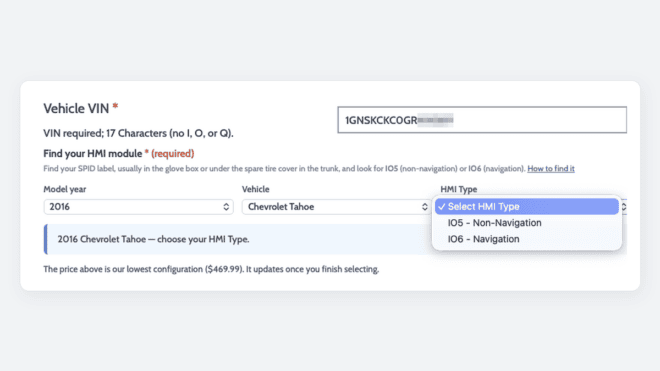
GM electronics are genuinely complicated. A single model year can include several hardware versions, and the differences between them are rarely visible to an owner. At White Automotive & Media Services (WAMS), our job is to absorb that complexity so you do not have to. Ordering GM parts by VIN is how we do it: you give us your VIN, and our tools work out the details that used to make ordering feel technical.
In short: WAMS builds VIN-based ordering tools so customers do not need to know GM platforms, electrical architectures, or build splits to order the right part. Enter your VIN, answer a question or two from your vehicle’s option label, and the page does the rest. When the tools cannot settle something, a person can.
Why We Built These Tools
Many of our parts are programmed to your specific VIN before they ship, and those parts are non-returnable, so fitment has to be right the first time. For years, getting it right meant asking customers to work through model year lists, architecture differences, and RPO codes. The information was always accurate, but it could make ordering feel more technical than it needed to be.
The need for accurate fitment has not changed. What has changed is who does the work. We have been moving it off the customer and onto the VIN, product by product, focusing on the products where ordering was hardest.
What Changed: Before and After
| Product | Before | Now |
|---|---|---|
| Replacement GM CSM Module | Work out your electrical architecture, find your model year in a list, and determine whether a 2022 truck was a pre-refresh or refresh build | Enter your VIN and select your radio type from your RPO list |
| Replacement GM HMI Module | Pick the right model year and HMI type from a list, and apply the 2015 versus 2015.5 rule by hand | Enter your VIN and choose IO5 or IO6 from your label. Some vehicles also get one question about VV4 |
| T1 refresh digital cluster upgrade | Confirm on your own that your truck is a refresh build | The page reads your VIN and warns you before checkout if it does not match the trucks this cluster fits |
The rest of this Tech Note walks through each tool, what it checks, and the one or two things that still depend on you.
Why Your VIN Matters
Two GM vehicles with the same year, make, and model can need different parts. Common examples:
- A 2022 Silverado or Sierra 1500 can be a pre-refresh build or a 2022.5 refresh build, with different electronics.
- Several models moved from Global A to Global B electrical architecture partway through their run.
- Radios and infotainment modules vary by factory option, such as navigation or the specific radio code.
Your VIN encodes the year, make, model, and build details that settle most of these questions. For more on why we ask for vehicle details, see Why WAMS Asks for Vehicle Details Before You Order. For more on the architecture split, see our Global A vs Global B identification guide.
Every VIN Field Checks the Format First
Any VIN field on our product pages checks that what you type is a valid GM VIN: 17 characters, none of the letters VINs never use (I, O, and Q), and a recognized GM format. That includes GM vehicles built in Canada, Mexico, Korea, China, and Europe, not just the US.
Our contact form goes a step further and checks the VIN’s check digit, which catches most single-character typos before your message reaches us.
Shop by Vehicle: Start From Your VIN
Not sure which products fit? On Shop by Vehicle, enter your VIN and the page decodes it and shows the products and services listed for your vehicle. You can also choose year, make, and model instead. If the VIN leaves more than one possibility, the page asks you to pick the right one before showing results.
VIN Lookup: CSM, IOR Radio, and HMI Replacements
Our most complete tool runs on the Replacement GM CSM Module, the Replacement GM IOR Radio Module, and the Replacement GM HMI Module. You start with your VIN and the page works out the rest:
- Model year, including half-year builds such as 2022.5
- Make, model, and platform
- Electrical architecture or module generation
- Whether a 2022 truck is a pre-refresh or refresh build
Once your vehicle is identified, the page shows the matching part and its price, along with a confirmation that names your vehicle and the radio or HMI type you selected, plus a reminder to check that your vehicle actually has it. On the CSM, if your vehicle only ever came with one CSM type, the page shows it instead of asking you to choose. On the HMI, the page also points out when a different product is likely a better fit for your vehicle.
What you still confirm is your factory radio configuration, identified by RPO codes on your vehicle’s label:
- On the CSM, you select your radio type from your RPO list.
- On the IOR radio, you confirm that your label shows IOR, because IOS, IOU, IOT, IOK, and IOV are different systems and will not fit.
- On the HMI, you choose IO5 (non-navigation) or IO6 (navigation). Vehicles with IOB or another radio code do not have an HMI, so this is not the right part for them. Some vehicles, including certain 2015 models, also get a question about VV4 (in-vehicle WiFi) on your label.
If you need help with this step, see Finding Your RPO Codes below. For background on the two infotainment systems, see our guide to GM HMI and CSM infotainment systems.
After you order, your confirmation email lists the vehicle details from your VIN, so you have a record you can double check.
VIN Fitment Checks: Clusters and ACM
Some products still offer a menu of versions, because the versions differ in ways the customer chooses, such as a cluster style or a model year range. On the products where wrong orders were most common, a VIN fitment check now compares your selection against your VIN before the part goes in your cart. It currently runs on:
- T1 refresh digital cluster upgrades, which are built for refresh pickups only
- Denali and High Country cluster upgrades for T1 trucks
- IOR color cluster upgrades for T1 trucks
- The Replacement GM Radio / Audio Control Module (ACM)
Here is what the check does:
- It decodes your VIN and shows the vehicle it found, so you can see at a glance whether it matches the vehicle you are ordering for.
- On the cluster upgrades, it compares the cluster option you picked against your vehicle’s year, and it reads your VIN to tell a 2022 pre-refresh truck from a 2022.5 refresh truck. To check this yourself, see our refresh identification guide.
- On the ACM, it checks that the model year of the version you selected matches the model year in your VIN, so you do not end up with a module built for a different year.
- If something does not line up, it warns you before the part goes in your cart. You can still continue after reviewing, but please double check first, because these parts are non-returnable.
The check covers what the VIN can tell us, so still read the fitment notes in each product description.
Finding Your RPO Codes
RPO codes are GM’s factory option codes, and they are how you confirm the few details a VIN check leaves to you, such as your radio type or navigation. There are two ways to get them:
- Look them up by VIN. Our GM RPO Code Lookup can pull the codes for most Chevrolet, GMC, Buick, and Cadillac vehicles originally sold in the US, 2022 model year and newer.
- Read them off the vehicle. Every GM vehicle carries its option list on a label, either the modern QR code RPO label or the older SPID label. Our guide to RPO and SPID labels shows where to find each one.
When You Are Not Sure, Ask Us
These tools handle most orders, but they are not a wall between you and a person. If your VIN is not recognized, a result looks wrong, or your vehicle is an unusual build, contact us with your VIN and we will tell you which part to choose based on how your vehicle was built.
It also helps to know what the tools do not do:
- They do not see your vehicle. They work from what is encoded in your VIN and what you select. Option-level details, like your radio code, remain yours to confirm.
- They do not diagnose a fault. A VIN check confirms fitment, not that the module you are replacing is the problem. Several faults can look like a failed module without being one, so have the vehicle properly diagnosed before ordering a replacement.
- They cannot cover every build. Export, fleet, and special-order vehicles can fall outside what the tools recognize. That is exactly when to reach out before ordering.
How It Fits Together
For a typical order, the path is simple. Start at Shop by Vehicle or the product page, enter your VIN, and let the page identify your vehicle. Confirm your radio or option code from your RPO label or the RPO Code Lookup, then check the vehicle shown before adding the part to your cart. For how installation works once the part arrives, see DIY-Friendly by Design.
We keep adding these tools to more of our catalog, because the goal stays the same: GM’s complexity should be our problem, not yours.
Frequently Asked Questions
Is WAMS hard to order from?
No. On our most requested replacement modules, you start with your VIN and the page works out your vehicle’s year, platform, and architecture. You answer one or two questions from your vehicle’s option label, and the page shows the matching part. If you are ever unsure, contact us with your VIN and we will point you to the right part.
Do I need to know my GM platform or electrical architecture to order?
Not on products with VIN lookup, such as the replacement CSM, IOR radio, and HMI modules. Those details are worked out from your VIN. You still confirm your factory radio or HMI type from your RPO label or our GM RPO Code Lookup.
What happens if the VIN fitment check flags my order?
The page warns you before the part is added to your cart and shows the vehicle it decoded from your VIN. Review your selection against that vehicle. You can still proceed, but these parts are non-returnable, so contact us with your VIN if you are unsure.
Can the fitment tools tell whether my 2022 Silverado or Sierra is a refresh truck?
Yes. The cluster fitment checks and the VIN lookup read your VIN to tell a 2022 pre-refresh build from a 2022.5 refresh build. You can also check it yourself using our refresh identification guide.
Does WAMS verify my vehicle before shipping?
Our tools check your VIN against the part’s fitment, but we cannot see your vehicle and do not verify the options you select. Your factory radio or option code is your responsibility, so check your RPO label before ordering.
Where do I find my RPO codes?
For most 2022 and newer vehicles originally sold in the US, our GM RPO Code Lookup can pull them from your VIN. For older vehicles, read them off the RPO or SPID label in the vehicle.
What if my VIN is not recognized?
Check it for typos first; VINs never contain the letters I, O, or Q. If it still is not recognized, or the vehicle shown looks wrong, contact us with your VIN and we will help you find the right part.