
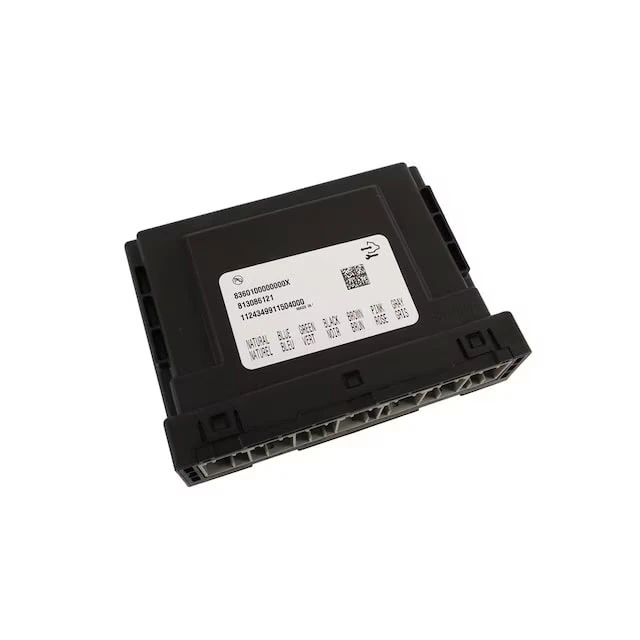
Short answer: on GM’s Global A trucks and SUVs, the body control module (BCM) decides how the lighting, locks, windows, remote start and key fob behave, and nearly all of that is set by a calibration that can be rewritten. WAMS offers a menu of standard applications for K2, T1 and Colorado/Canyon trucks at one flat price, and can change nearly anything else the BCM controls as a custom application. Here’s what the BCM controls, how custom programming works and what can be changed on each platform.
What the BCM controls on GM Global A trucks
The body control module is the computer behind almost every body electronics function in the truck: exterior and interior lighting, turn signals and hazards, door locks and keyless entry, power windows, remote start, chimes, the alarm and retained accessory power. It is also the vehicle’s VIN and security authority, which other modules check against when the truck starts.
That second role is why BCM work has to be done carefully. The module stores data tied to your specific vehicle, so feature changes are made to the BCM already in the truck rather than by swapping in a different one.
How custom BCM programming works
A GM BCM runs two layers of data. The operating software is the program itself and is the same across many vehicles. The calibration is the set of values that program reads to decide how your truck behaves. A single Global A BCM calibration holds thousands of values, and they come in a few types:
- Enables: on and off switches, such as whether fog lamps may stay on with the high beams.
- Option content: settings that tell the BCM which factory equipment is installed, such as fog lamps, heated seats or bed rail lamps. These are what make retrofit parts work.
- Timers and counts: remote start run time, lamp timeouts, flash counts and chirp counts.
- Rates and duty cycles: dome lamp fade speed, flasher timing and hazard flash rate.
- Lookup tables: multi-point maps, such as instrument panel dimming curves and speed-compensated wiper delays.
Custom programming means reading your truck’s factory calibration, changing only the values you ordered and writing it back. We keep the original file, so any change can be returned to stock. A dealer can’t do this: dealer tools only load the calibrations GM released for your vehicle’s factory build, which is also why GM dealers can’t program most retrofits.
Supported platforms
- K2 trucks and SUVs: 2014-2018 Silverado and Sierra 1500, 2019 Silverado LD and Sierra Limited, 2015-2019 2500HD and 3500HD, 2019-2025 Silverado 4500HD-6500HD, and 2015-2020 Tahoe, Suburban, Yukon and Escalade. K2 custom BCM programming
- T1 pickups: 2019-2022 Silverado and Sierra 1500 (pre-refresh) and 2020-2023 2500HD and 3500HD. T1 custom BCM programming
- Colorado and Canyon: 2015-2022 Chevrolet Colorado and GMC Canyon, gas and 2.8 Duramax. Colorado and Canyon custom BCM programming
- 2007-2014 trucks and SUVs: covered by our 2007-2014 C/K truck and SUV BCM programming.
Standard applications
These are the changes owners ask for most. Every one is included in the same flat price, so choosing one or all of them costs the same. Availability varies by platform, model year and trim, and features that depend on factory equipment only apply when that equipment is installed. Each platform’s listing shows exactly what’s offered for your truck.
- Lighting: cargo and bed lamps that work while driving, fog lights with high beams or IntelliBeam, hyperflash delete for LED turn bulbs, and US or Canadian market lighting conversion.
- Convenience: roll up the windows from the key fob, 20-minute remote start, cooled seats with remote start, disable auto idle shutdown and a higher BCM speed limit.
- Settings: longer light and window timers, tap-to-pass flash count and key fob lock and unlock flashes.
- Retrofit activations: turn on GM parts added from a higher trim, such as fog lights, heated and ventilated seats, bed rail lamps, puddle lamps, power tailgates, separate amber turn signals and a one-touch window switch.
Custom applications: nearly anything in the BCM
The standard menu is a short list drawn from a very long one. Nearly anything the BCM controls can be changed as a custom application, because nearly every behavior it has is set by a calibration value we can rewrite: an enable, a timer, a count, a rate or a lookup table. If your truck’s BCM decides it, we can almost always change it. Examples of what we build as custom applications:
- Approach and exit lighting: which lamps make up the welcome and exit lighting themes, how long they stay on, whether an ambient light check is required, and the delay before they fade.
- Daytime running lights: the DRL source (dedicated LED, reduced or full low beam, fogs, park or turn lamps), whether DRLs are selectable or forced, and whether parking lamps join in.
- Interior lighting: dome lamp fade-on and fade-off rates, separate timeouts for each door and ignition event, dimming curves for the instrument panel and switch backlighting, and minimum LED brightness.
- Headlamps: automatic headlamp light-sensor thresholds and transition timers, headlamp delay after engine run, flash-to-pass timing, and battery rundown timers.
- Turn signals and hazards: flasher on and off time, hazard flash rate and duty cycle, and lane-change flash timing.
- Locks and key fob: relock-after-remote-unlock behavior and its timeout, delayed door lock time, lock and unlock confirmation flash count and duration, horn chirp count and length, and vehicle locator chirp settings.
- Windows and power: retained accessory power timeout and global window button behavior.
- Wipers and washers: post-wash wipe count, washer-to-wipe delay, speed-compensated intermittent delay tables, and how many wiper sweeps turn on the headlamps.
- Chimes and alarm: door chime limits and panic alarm duration and horn timing.
Custom applications are quoted separately, based on what’s involved. Contact us with your VIN and the behavior you want changed, and we’ll confirm whether it’s possible on your BCM and what it costs before you order.
What we don’t change: emissions-related functions, and settings that would make the vehicle unsafe or illegal to drive on public roads.
What isn’t in the BCM
Some features people expect from BCM programming live in other modules:
- Engine control module (ECM): manual high idle, remote start run time beyond 20 minutes, idle speed and engine-side speed limits.
- Instrument cluster (IPC): gauges, driver information center pages and indicator lamps, such as the fog light indicator after a fog lamp retrofit. See instrument cluster programming.
- Infotainment and HVAC: radio, navigation and climate settings each have their own module.
If your BCM has failed rather than just needing new settings, you need a replacement module instead. Our replacement GM Global A BCM is available with Ship in Data Transfer: you send in the original module, and we move its VIN, security and vehicle data to the new one. Custom features can be programmed into the new BCM during that transfer, so a failed module is a good time to add them. See also what a GM BCM replacement really costs.
How ordering works
- Choose your platform’s listing and enter your 17-digit VIN. Coverage is checked before the item goes in your cart.
- Pick your standard applications, or contact us first for a custom application.
- Remove your BCM and ship it to us. Return shipping is calculated at checkout.
- We build the calibration from your truck’s factory file and program the module.
- It comes back plug and play, with your original calibration kept on file.
GM BCM programming FAQ
What is the difference between BCM programming and a BCM calibration?
Programming is the act of writing data to the module. The calibration is the data itself: the set of values that tells the BCM how to behave. Custom BCM programming means building a new calibration with different values and writing it to your module.
Can a GM dealer do custom BCM programming?
No. A dealer can only load the calibrations GM released for your vehicle’s factory build. Those can’t be edited, so a dealer can’t change a timer, keep the fogs on with the high beams or switch on a part your truck wasn’t built with.
Is BCM programming the same as an engine tune?
No. The BCM controls body electronics such as lighting, locks, windows and remote start. Engine tuning changes the engine control module (ECM), which handles fueling, idle and power. Some features, like manual high idle, need ECM changes and are outside BCM programming.
Do I need a new BCM to get these features?
No. The features are programmed into the BCM your vehicle already has. If your BCM has failed, choose Ship in Data Transfer on our replacement BCM: you send in the old module, we move its data to a brand-new one, and we can program these features into it at the same time.
How many settings are in a GM BCM?
A single Global A BCM calibration holds thousands of individual values, from simple on and off enables to timers, counts and full lookup tables. Our standard applications cover the changes owners ask for most, and nearly anything else in the BCM can be changed as a custom application.