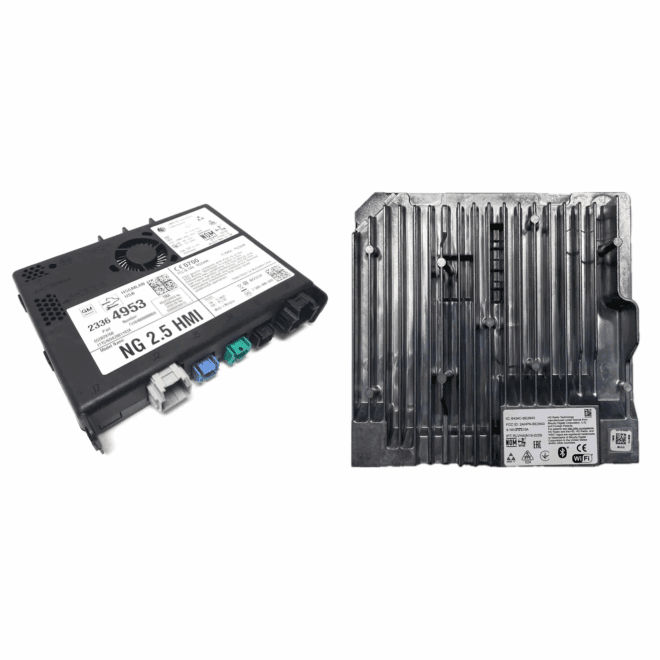
Understanding which infotainment module your GM vehicle uses is essential when diagnosing failures or selecting a proper replacement. GM has used two major infotainment architectures over the past decade: the HMI-based system (2013–2019 applications) and the newer CSM-based system (2018.5–2026 applications).
This guide explains how each system works, how to identify what your vehicle has, and the differences between replacement and upgrade paths.
What an HMI Is and How GM Used It
GM introduced the Bosch Human Machine Interface (HMI) module with the first-generation Cadillac CUE system in the 2013 model year. It then entered widespread use across Buick, Chevrolet, GMC, and Cadillac models from 2014 through 2019.
If your vehicle has an 8-inch display from this period, you almost certainly have an HMI-based infotainment system. To confirm, locate your Service Parts Identification (RPO) label—usually in the glove box—and check for RPO IO4, IO5, or IO6.
- IO4 – Base 4.2-inch display
- IO5 – Mid-level 8-inch display without factory navigation
- IO6 – Up-level 8-inch display with factory navigation
If you see IO4, IO5 or IO6, your vehicle uses an HMI.
HMI Generations
HMI 1.1 – 2013 Cadillac CUE Only
The earliest production implementation, used exclusively in the initial CUE release.
HMI 2.0 – 2014–2015 Applications
These units came in two variants—an early version without the “texting” application and a later one with it and support for in Vehicle WIFI. Hardware is identical, but the base software, calibrations and map database structures differ.
HMI 2.5 – 2016+ Applications
This generation introduced a major hardware upgrade that enabled Apple CarPlay and Android Auto. It also substantially improved speed and responsiveness. Earlier 2.0 vehicles can be upgraded via WAMS CarPlay/Android Auto upgrade kit.
HMI 3.x – 2019+ Applications
The 3.x family is often mislabeled as an HMI, but it is actually the beginning of the CSM (Center Stack Module) era. It shares almost nothing in common with HMI-based systems and should be treated as a separate architecture.
HMI Failure Symptoms
The HMI is one of the most common failure points in GM infotainment systems. Typical symptoms include:
- Blank or black display
- Frozen or scrambled display
- Stuck on “Waiting for Update Media”
- Slow, unresponsive menus
- Missing audio sources or non-responsive inputs
“Waiting for Update Media” is the only guaranteed HMI failure mode. Other symptoms may originate elsewhere, so a proper GM dealer diagnosis is required before replacement.
Choosing the Correct Replacement HMI
When ordering a replacement, you must select:
- The same model year
- The same module hardware (IO5 non-navigation or IO6 navigation)
Part numbers supersede often and do not matter—selecting the correct year and configuration delivers the proper part.
WAMS-supplied units are:
- Brand new (not used, refurbished, or core-exchange units)
- Programmed to your VIN
- Loaded with the latest software
- Covered by the full GM parts warranty
- Plug-and-play once the battery is disconnected and reconnected
For 2013–2015.5 vehicles, it is typically more cost-effective to purchase the complete CarPlay/Android Auto Upgrade Kit, which includes newer hardware, better performance, and more features.
You can click here to order a new HMI for your GM Vehicle.
Understanding the CSM (2017.5–2026 Applications)
Beginning around mid-2017 on certain platforms, GM transitioned to the Center Stack Module (CSM), which integrates what used to be multiple separate components into a single unified module. CSM-equipped vehicles do not use an HMI.
CSM failures commonly present as:
- Blank or black screens
- Frozen or scrambled displays
- “Update Failed. Return to Dealer” messages
CSM replacements offered by WAMS are factory-new North American–spec units, programmed for your VIN, and fully registered on the GM backend for proper operation of WiFi, App Shop, OnStar, mobile apps, and other connected features.
Identifying Whether Your Vehicle Uses a CSM
Check the home screen:
- If it resembles the modern IOS/IOU/IOT layouts shown in our product listings and includes an App Shop, you likely have a CSM.
- Scan the QR code on the driver’s door/B-pillar to retrieve your RPO list.
- Look for RPO IOS, IOU, IOT, or IOK.
If you see IOR instead, you have a conventional radio—not a CSM.
You can click here to order a new CSM for your GM Vehicle.
HMI vs. CSM: How They Differ Functionally
Although the user experience is similar, these two systems operate very differently:
HMI-Based System (2013–2019)
Consists of multiple modules:
- HMI – Graphics, navigation database, projection features, user interface logic
- Radio/ACM – Audio processing, tuner functions, and master control for the infotainment communication
- Various other Modules on the MOST bus.
A failure in any of these modules can mimic an HMI problem, which is why correct diagnosis is critical.
CSM System (2018.5–2026)
Consolidates many prior functions into one physical unit:
- User interface processing
- Audio system integration
- Radio tuner functions
- App Shop support
- Communication handling for connected features
Because it centralizes the functions previously spread across several modules, the CSM is both more powerful and more failure-sensitive.
Replacement vs. Upgrade
WAMS replacement HMIs and CSMs are not upgrade modules. They are 1:1 factory-spec replacements programmed for your specific vehicle build.
If you want to ADD:
- Navigation
- Apple CarPlay / Android Auto
- Wireless CarPlay / Wireless Android Auto
- HD Radio
- Faster hardware
Those require dedicated WAMS upgrade solutions found in other categories.
Important Notes Before Ordering
- Ensure a GM dealer has positively diagnosed an HMI or CSM failure. Many issues that look like module faults originate elsewhere.
- These units are non-returnable because they are VIN-programmed and are VIN warranty registered special-order parts.
- 2015.5 navigation HMIs are no longer produced new; WAMS supplies factory-refurbished units when applicable.
- Export (non-North American) units are available by request.
- Screen “ghost touch” issues are almost always caused by the display digitizer, not the HMI or CSM.
FAQ
Q: How do I determine whether my GM vehicle uses an HMI or a CSM?
A: Check your vehicle’s RPO codes. IO4, IO5, and IO6 indicate an HMI-based system. IOS, IOU, IOT, and IOK indicate a CSM-based system. A vehicle using RPO IOR is not HMI or CSM equipped; it uses a base radio architecture.
Q: Do HMI and CSM modules come pre-programmed for my vehicle?
A: Yes. Both HMIs and CSMs require VIN-specific programming. A correctly configured replacement will arrive with factory-spec programming for the vehicle it is intended for.
Q: Do I need to visit a dealer after replacing an HMI or CSM?
A: No dealer programming or setup is typically required if the unit is properly programmed for your vehicle beforehand. Installation is normally plug-and-play after disconnecting the battery.
Q: What symptoms indicate an HMI or CSM module may be failing?
A: Common symptoms include blank or black displays, scrambled graphics, frozen screens, missing audio functions, “Update Failed. Return to Dealer” and “Waiting for Update Media” messages. Proper diagnosis is important because other modules or wiring faults can cause similar behavior.
Q: Will replacing the HMI or CSM fix random touchscreen inputs or “ghost touch” issues?
A: Generally No. Ghost-input behavior in 99% of instances that we’ve seen is caused by a failing display digitizer or controller; not the HMI or CSM. The display assembly must be replaced to correct this issue.
Q: Do part numbers matter when replacing an HMI or CSM?
A: No. These modules supersede often. Selecting the correct model year, configuration, and RPO type ensures the appropriate module is supplied, regardless of part number changes.