
Description
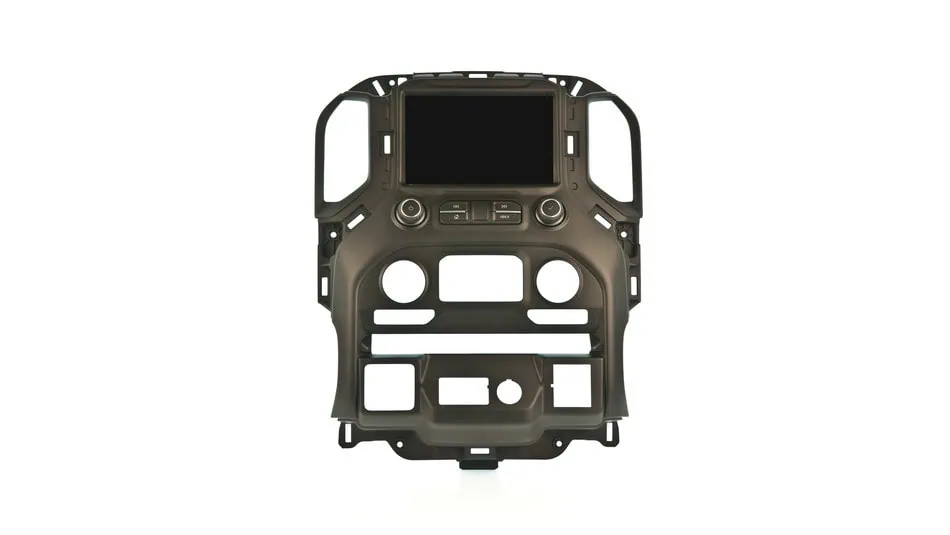
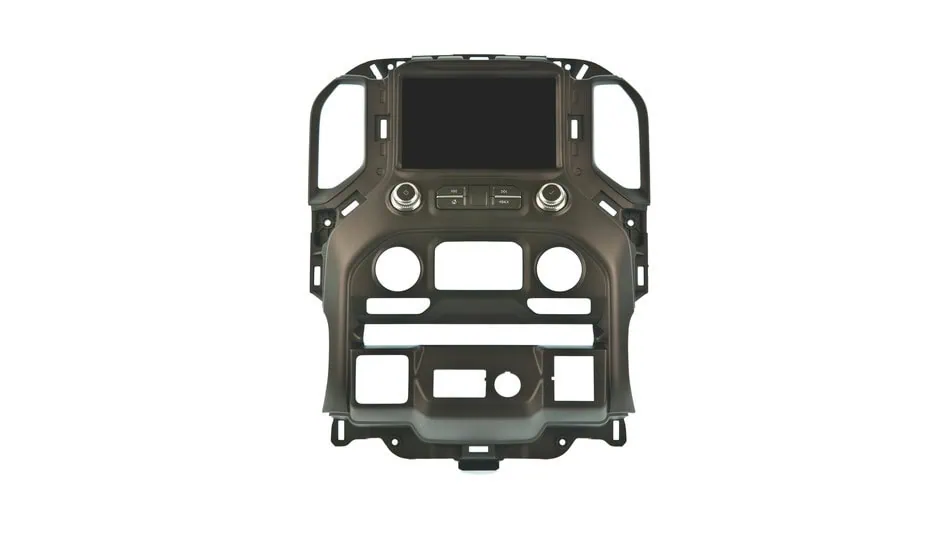
Ghost touches, phantom inputs, dark spots, lines or scrambled images across the display, cracked glass, or a touch screen that has stopped responding? This is a brand-new OEM GM replacement 8 inch touch screen assembly, complete with the trim surround, for the 2019-2022 Chevrolet Silverado 1500 and GMC Sierra 1500 and the 2020-2023 Silverado and Sierra 2500HD and 3500HD (T1 platform, before the refresh). It installs as a direct replacement with no programming. You move your existing HVAC controls, heated seat buttons and other switches from the old assembly to the new one.
New GM parts only. Most of what you will find when you search for a Silverado touch screen replacement is a repair service or an aftermarket digitizer glued onto your old display. This is neither. It is a new, complete GM screen, the same part the factory installed, so you are not sending your truck’s screen away or trusting a third-party glass panel.
This is the touch screen assembly in the center of the dash: the screen with the trim surround around it. It is not the radio, not the CSM, and not the instrument cluster. Your existing radio or CSM module stays in the truck.
About the photos: the pictures show the Chevrolet and GMC assemblies for trucks with heated front seats. If your truck does not have heated front seats, your assembly will look different from the photos, because it is built for a truck without heated seat buttons. That is expected, and it is the correct part for your truck. The vehicle picker asks about heated seats so you get the right one.
Silverado and Sierra touch screen replacement: fitment
| Vehicle | Years (T1, pre-refresh) | Infotainment |
|---|---|---|
| Chevrolet Silverado 1500 | 2019-2022 (2022 pre-refresh only) | 8″ IOS, IOT or IOR |
| GMC Sierra 1500 | 2019-2022 (2022 pre-refresh only) | 8″ IOS, IOT or IOR |
| Chevrolet Silverado 2500HD / 3500HD | 2020-2023 | 8″ IOS, IOT or IOR |
| GMC Sierra 2500HD / 3500HD | 2020-2023 | 8″ IOS, IOT or IOR |
You do not pick the part number. The vehicle picker works it out from your truck and two quick questions, covered below.
Not covered:
- Refreshed trucks: the 2022.5 and later Silverado and Sierra 1500 and the 2024 and later HD. These use the 13.4 inch screen, or a 7 inch screen on the WT, Custom and Sierra Pro trims that kept the older-style dash. Neither is this part.
- 2019 Silverado LD and 2019 Sierra 1500 Limited: these carried over the previous body and take the K2 screen. See our 2014-2019 Silverado and Sierra 8 inch screen.
- IOR with the 7 inch screen: a different part, not sold on this listing.
- IOB base radio: not covered.
- Tahoe, Suburban, Yukon and Escalade: the full-size SUVs use different screens and are not covered by this listing.
2022 Silverado and Sierra 1500 owners: check that your truck is not a refresh model
GM built the 2022 1500 in two versions. The early 2022 trucks are pre-refresh and this screen fits them. The later 2022.5 trucks are refresh models with different electronics, and this screen does not fit.
Older interior does not mean older electronics. The WT, Custom and Sierra Pro trims kept the older-looking dash on refresh trucks, so a truck can look pre-refresh inside and still be a refresh truck underneath.
To check, scan the QR code on the driver door jamb (B-pillar) with your phone and look for RPO code J22. J22 means a refresh truck, and this screen will not fit. Our guide How to tell if you have a refresh Silverado or Sierra walks through it step by step.
How the vehicle picker chooses your screen
GM built this screen in several versions. They are different parts, not different settings, and the wrong one will not work correctly. Pick your truck, then answer two questions:
- Is there an App Shop icon on your home screen?
- Does your truck have heated front seats?
That is all. The make comes from the truck you pick, so we never ask for it.
The App Shop tells you which infotainment system you have
The easiest way to tell is the App Shop. Every IOS and IOT system has it. IOR does not. If your home screen has an App Shop icon, you have IOS or IOT. If it does not, you have IOR.
If you have IOR, the picker also asks whether your screen is 7 inch or 8 inch. Read the section on measuring below before you answer.
Want to double check? Scan the QR code on the driver door jamb to see your truck’s RPO codes. IOS, IOT or IOR names the infotainment system. UIK or UIJ means an 8 inch screen, and UIR means a 7 inch screen. KA1 means heated front seats. Trucks in this range do not have the printed SPID label in the glove box, so the QR code is the place to look. See GM RPO label vs SPID label and our GM RPO code lookup.
7 inch or 8 inch? Measure diagonally
Screens are measured corner to corner, not across. An 8 inch screen is only about 7 inches wide, so if you lay a tape measure straight across a correct 8 inch screen you will read “7 inches” and could order the wrong part. Measure the lit display area from one corner to the opposite corner. Close to 8 inches means you have the 8 inch screen, and this listing fits. Close to 7 inches diagonally means you have the 7 inch screen, which is a different part.
Ghost touch, dark spots, cracks and other screen symptoms
These point to the screen itself, and a new screen fixes them:
- Ghost touch: the screen registers touches you did not make. Stations change, menus open on their own or calls start dialing.
- Dead touch: the picture looks normal, but parts of the screen, or all of it, no longer respond when you press.
- Dark spots or patches on the display, or areas that look dim or faded.
- Cracked or shattered glass.
Black screen, blank screen, lines or scrambled images: it may not be the screen
Your truck’s picture comes from a module behind the dash, not from the screen itself. Trucks with IOR use the radio module, and trucks with IOS or IOT use the CSM. When that module fails, the screen often gets the blame. These symptoms can come from either the screen or the module:
- A completely black or blank screen, or one that never comes on at all.
- Lines across the display, or scrambled, flickering or distorted images.
- A screen that freezes, reboots on its own or gets stuck on the startup logo.
If you see any of these, please have the truck diagnosed before you order, because these screens are non-returnable. If the module is the failed part, a new screen will not fix it. See our Replacement GM IOR Radio Module for IOR trucks, or our Replacement GM CSM Module for IOS and IOT trucks. The App Shop check above tells you which system you have. If you are not sure which part you need, contact us with your VIN and a description of the problem.
Why the number on your old screen may not match
GM has issued many part numbers for this screen since 2019, and many of the older ones have been superseded. We supply the current GM part for your configuration, usually a newer number than the one on your original, so the part you receive may carry a different number. It is the correct replacement.
Installation and programming
No programming and no dealer visit. The assembly comes with the trim surround already fitted, so the swap is mechanical:
- Use a nylon trim tool to release the old screen assembly from the dash and unplug it.
- Move your existing controls across. Remove the HVAC (climate) controls, the heated seat buttons and any other switches mounted in the old assembly, and fit them to the new one. These controls are not included with the new assembly.
- Plug in the new assembly, check that the screen and every control you moved works, then clip it into the dash.
What’s included
- Included: brand-new OEM GM 8 inch touch screen assembly with the trim surround.
- Not included: the HVAC controls, heated seat buttons and other switches. You transfer these from your old assembly.
- Not included: the radio (IOR) or CSM (IOS or IOT) module. Your existing module stays in place.
- No core charge and no core return.
Before you order
Please have the truck diagnosed to confirm the screen is the failed part before you order. These are non-returnable.
Click here to see the GM part numbers this screen replaces
If you are searching by the number on your old screen, it may be in this list. Check every digit. GM numbered these screens in consecutive runs, so a number one digit away from yours is often a different version. The vehicle picker selects the right screen for you, so rely on it rather than this list.
84469599, 84499491, 84499494, 84499496, 84569058, 84569060, 84569061, 84569062, 84569063, 84692393, 84692395, 84743964, 84743965, 84743966, 84743967, 84743968, 84743970, 84743972, 84746877, 84746879, 84746880, 85783478, 85783479, 85783480, 85783481, 86820216, 86820217, 86820218, 86820219, 86825908, 87817846, 87817847, 87817849
Why WAMS
White Automotive & Media Services has specialized in OEM-correct GM electronics since 2003. Brand-new GM hardware only, never salvage and never aftermarket. Family-owned in Wixom, Michigan, with more than 20 years of GM electronics experience.
Silverado touch screen replacement: frequently asked questions
Which trucks and years does this screen fit?
The 2019-2022 Chevrolet Silverado 1500 and GMC Sierra 1500 (pre-refresh 2022 only) and the 2020-2023 Silverado and Sierra 2500HD and 3500HD, with an 8 inch IOS, IOT or IOR infotainment system. It does not fit 2022.5 and later 1500 trucks, 2024 and later HD trucks, the 2019 Silverado LD or 2019 Sierra 1500 Limited, or the full-size SUVs.
I have a 2022 Silverado or Sierra 1500. How do I know if it is a refresh truck?
Scan the QR code on the driver door jamb and look for RPO code J22. J22 means a 2022.5 refresh truck, and this screen does not fit it. No J22 means a pre-refresh truck, and it does. Do not go by the interior: WT, Custom and Sierra Pro refresh trucks kept the older-looking dash.
What is the difference between IOS, IOT and IOR, and how do I tell which I have?
They are the infotainment systems GM fitted to these trucks. The easy check is the App Shop: IOS and IOT have an App Shop icon on the home screen, and IOR does not. You can confirm by scanning the QR code on the driver door jamb and finding IOS, IOT or IOR in the RPO list.
Why does it ask about heated seats?
GM built this screen in versions for trucks with and without heated front seats. They are different parts that look different, so the answer decides which screen we send. Our photos show the heated seat version, so if your truck has no heated front seats, yours will not match the photos exactly. You can confirm with RPO code KA1 (heated front seats) on your QR code list.
My truck has the 7 inch screen. Is this the right part?
First check how you measured. Screens are measured diagonally, and an 8 inch screen is only about 7 inches wide, so measuring straight across a correct 8 inch screen reads 7 inches. Measure the lit display from corner to corner. If it really is 7 inches diagonally (RPO UIR), this listing does not fit your truck.
Is this the screen or the radio?
The screen assembly with its trim surround. Your radio (IOR) or CSM (IOS or IOT) module stays in the truck and is not included.
What do I need to move from my old screen to the new one?
Your HVAC (climate) controls, heated seat buttons and any other switches mounted in the old assembly. The new assembly comes with the trim surround fitted but without these controls, so you transfer them from your old one before installing it.
My screen is black, blank or scrambled. Is it the screen, the radio or the CSM?
It can be any of them. A black or blank screen, lines, scrambled or flickering images, freezing or rebooting can come from the screen, from the radio module in IOR trucks, or from the CSM in IOS and IOT trucks. Please have the truck diagnosed before you order, because these screens are non-returnable and a new screen will not fix a failed radio or CSM. Ghost touch, dead touch spots, dark patches and cracked glass point to the screen itself.
Why is the part number on my old screen different from the one I received?
GM has superseded many of the earlier numbers for this screen. We supply the current GM part for your configuration, which is often a newer number than the one on your original. It is the correct replacement.
Does it need programming or a dealer visit?
No. There is no programming and no dealer visit. You only need to move your existing controls from the old assembly to the new one.
I have a 2019 Silverado LD or 2019 Sierra 1500 Limited. Does this fit?
No. Those trucks carried over the previous K2 body and take the 2014-2019 Silverado and Sierra 8 inch screen, which we sell as a separate listing. Do not confuse them with the 2022 pre-refresh 1500, which this screen does fit.
Is there a core charge?
No. There is no core charge and you do not need to send your old screen back.
Is this new or refurbished?
Brand new. This is a new OEM GM screen, not a repaired screen, a refurbished unit or an aftermarket digitizer fitted to your old display.
Reviews
There are no reviews yet.