
Description
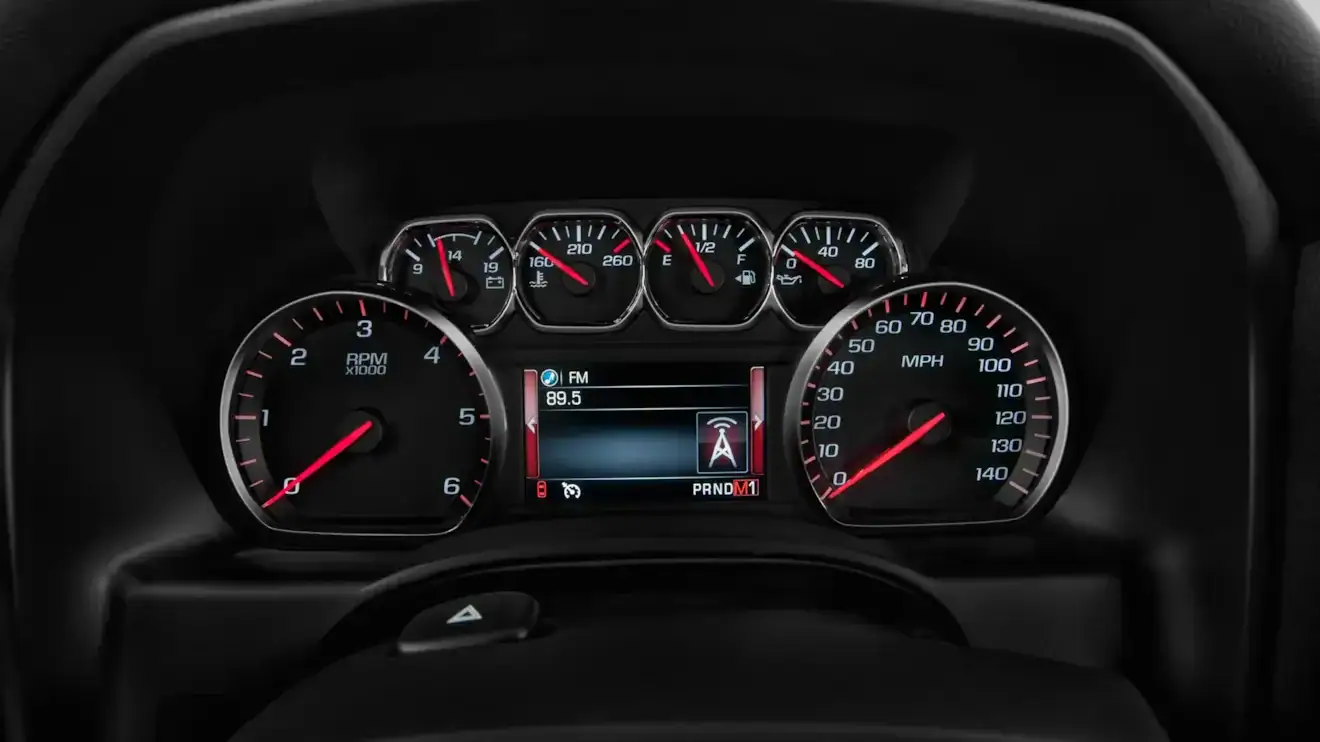
This WAMS exclusive programming service makes your steering wheel controls work inside Apple CarPlay and Android Auto on the factory 4.2-inch color instrument cluster (RPO UDD). It is built for 2014-2015.5 Silverado, Sierra, Tahoe, Suburban and Yukon owners who have added CarPlay and Android Auto with an OEM retrofit and want the buttons on the wheel to work again.
You keep the cluster you have. Send it to us, we program it to your VIN, and it plugs back into the dash. No wiring, no dealer visit and no new hardware.
Why the steering wheel controls stop working
These trucks and SUVs were built before GM offered CarPlay and Android Auto. The factory cluster software predates both, so after the retrofit it does not fully support steering wheel control inside those apps. Controls outside CarPlay and Android Auto keep working as they always have. Inside the apps, Siri Eyes Free, answering and ending calls, volume and track skip are the functions most often missing, especially on iPhones running iOS 15 or later.
What you get
- Full steering wheel control inside Apple CarPlay and Android Auto, including Siri and Google voice activation
- Your original cluster, with its original look and lighting, programmed to your VIN
- Plug-and-play reinstall with no dealer visit
Which service fits your vehicle
| Your situation | Best fit |
|---|---|
| You have the factory 4.2" color cluster (UDD) and want to keep it | This service |
| You want a new, larger digital Denali cluster | Denali Cluster Upgrade Kit |
| You bought a Denali cluster and need it programmed | Denali Cluster Programming Service |
| You have a 2014-2015.5 Denali cluster | 2014-2015.5 Denali Cluster CarPlay Controls Service |
| You haven’t added CarPlay and Android Auto yet | CarPlay and Android Auto Upgrade Kit first |
| You have the 4-inch radio (RPO IO4) | 4-inch to 8-inch Screen Upgrade first |
Before you order
- Your vehicle has a working OEM CarPlay and Android Auto retrofit using our upgrade kit or the modules on our supported hardware list. If you used other hardware, contact us first.
- Your cluster is the 4.2-inch color unit, RPO UDD on the SPID label in the glove box. This service is not for Denali clusters.
- Choose 2015.5 as your model year if your SPID label lists RPO AVF or VV4.
- You can send the cluster from your vehicle or a used one. A used cluster must match your model year, trim and lighting color, so check with us before you buy.
How it works
- Place your order with your VIN, model year and transmission.
- Ship your cluster to us following our Shipping Instructions.
- We program the cluster to your VIN and ship it back.
- Disconnect the battery, plug the cluster in and reconnect the battery.
What to expect after install
- The engine hour reading resets to zero.
- An Off Road menu is added. It is fully functional on 2015.5 models and shows four-wheel-drive status on 2014 and 2015 models.
- Some early 2015 2500HD and 3500HD trucks may show a Hill Assist message. It does not affect how the truck drives, and a GM dealer software update to the EBCM and CCM removes it.
Frequently asked questions
Q: What does this service do?
A: It reprograms your factory 4.2-inch color instrument cluster (RPO UDD) so your steering wheel controls work inside Apple CarPlay and Android Auto after an OEM CarPlay and Android Auto retrofit. You keep your original cluster, and it goes back in the dash programmed to your VIN.
Q: Do I need this after a CarPlay or Android Auto upgrade?
A: Not always. Steering wheel controls outside CarPlay and Android Auto keep working as they did before. Inside those apps, support varies by vehicle and phone. Siri Eyes Free, answering and ending calls, volume and track skip are the functions most often missing, especially on iPhones running iOS 15 or later. If the controls you use every day already work, you may not need this service. If they don’t, this is the service that restores them.
Q: Which vehicles is this for?
A: 2014-2015.5 Chevrolet Silverado 1500 and GMC Sierra 1500, 2015-2015.5 Silverado and Sierra 2500HD and 3500HD, and 2015-2015.5 Chevrolet Tahoe, Chevrolet Suburban, GMC Yukon and Yukon XL with the factory 4.2-inch color cluster (RPO UDD).
Q: How do I know if I have the UDD color cluster?
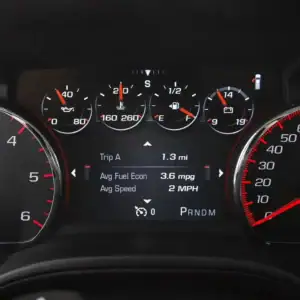
A: Check the SPID label in your glove box for RPO code UDD. On the road, it is the cluster with analog gauges and a 4.2-inch color display in the center. If your truck has the larger Denali cluster, this is not the right service.
Q: Do I need your CarPlay and Android Auto kit first?
A: You need a working OEM CarPlay and Android Auto retrofit before this service will help. Our Apple CarPlay and Android Auto Upgrade Kit or the modules on our supported hardware list are what this service is built around. If your retrofit used other hardware, contact us before ordering.
Q: Do you supply the cluster?
A: No. This is a programming service for a cluster you send us. If you don’t want to pull the cluster from your vehicle, a used or salvage UDD cluster works, as long as it matches your vehicle.
Q: Can I send a used or salvage cluster?
A: Yes. It must match your model year, trim and lighting color. There are many variants, so contact us with the part number before you buy one and we will confirm it fits your vehicle.
Q: Is my truck a 2015 or a 2015.5?
A: Check the SPID label in your glove box. If it lists RPO AVF or VV4, you have a 2015.5.
Q: What happens to my engine hours?
A: The engine hour reading on the cluster resets to zero as part of this service.
Q: Why do I see a Hill Assist message on my 2015 2500HD or 3500HD?
A: Some early 2015 heavy-duty trucks with their original brake and chassis control software already send Hill Start Assist data on the vehicle network. After this service the cluster can display that message. It does not change how the truck drives. A software update to the EBCM and CCM at a GM dealer removes it.
Q: What is the new Off Road menu?
A: This service adds the Off Road menu to your cluster. It is fully functional on 2015.5 models. On 2014 and 2015 models it shows four-wheel-drive status, because the rest of the data is not on the vehicle network in those years.
Q: Should I choose this service or a Denali cluster?
A: Choose this service if you like the cluster you have and want the steering wheel controls working at the lowest cost. Choose the Denali Cluster Upgrade Kit if you want a larger digital display, a new GM part and, on a Silverado, Tahoe or Suburban, lighting that matches your interior. The Denali kit also restores steering wheel control inside CarPlay and Android Auto.
Q: Can you do this to my factory Denali cluster?
A: Not with this service. It is for the UDD color cluster only. For a 2014-2015.5 Denali cluster, use our 2014-2015.5 Denali Cluster CarPlay and Android Auto Steering Wheel Controls Programming Service.
Q: How do I install the cluster when it comes back?
A: Disconnect the battery, plug the cluster in, and reconnect the battery. There is no wiring, no dealer visit and no additional programming. Mileage is read from the vehicle.
Daniel May (verified owner) –
Couldn’t be happier with the overall experience. I upgraded my 2014 Silverado to Apple Car Play and also had my cluster reprogrammed to use my steering wheel controls. I was a little nervous about shipping my cluster in, and had quite a few questions. WAMS too the time to answer all of them. Everything was returned back to me earlier than quoted. It was all plug and play and worked just as it should the first time I turned it all on. The only constructive criticism I would have is that I never received a shipping email for my first shipment. I had to check in my account on the website.
Tasse Benoit (verified owner) –
Perfect .
John Normandy (verified owner) –
I purchased the Android Auto/Apple Carplay upgrade from WAMS. I emailed them early on and asked them about whether or not my steering wheel controls would work after the Android Auto upgrade as I had read that the upgrade could impact the functionality of the steering wheel controls. They were very honest and said that based on their experience, I would lose functionality of the steering wheel controls after the upgrade, but their cluster reprogramming service would restore this functionality 100%. I had looked at a couple of competing Android Auto upgrades and those vendors were all very squishy about whether or not the steering wheel controls would work which made me suspect of their expertise. I installed the WAMS Android Auto upgrade and the steering wheel controls were non-functional just as WAMS had told me. I decided to spring for the cluster reprogramming service as I am in my car a lot and use the steering wheel controls all the time. I sent my cluster in to WAMS and they had it back to me much earlier than the lead times published on their website. The service is not cheap but its much less expensive than the Denali cluster upgrade which makes it an excellent option if you are happy with the cluster that comes with your vehicle. I’m very happy with the products and customer service. The Android Auto upgrade and cluster reprogramming were worth every penny to me.
cdogg (verified owner) –
what a great upgrade! simple, efficeient and now i can use my android auto without having to go full tilt to a denali cluster.